Guests & Messaging

No more spreadsheets. No more messaging every family one by one.

Your couple shares contacts straight from their phone. You organize both sides in one list, then send every family its invitation at once, by WhatsApp, email or text, and watch the replies come in.

Names are enough to start. Guests fill in the rest from the link you send.

14-day free trial · No credit card required

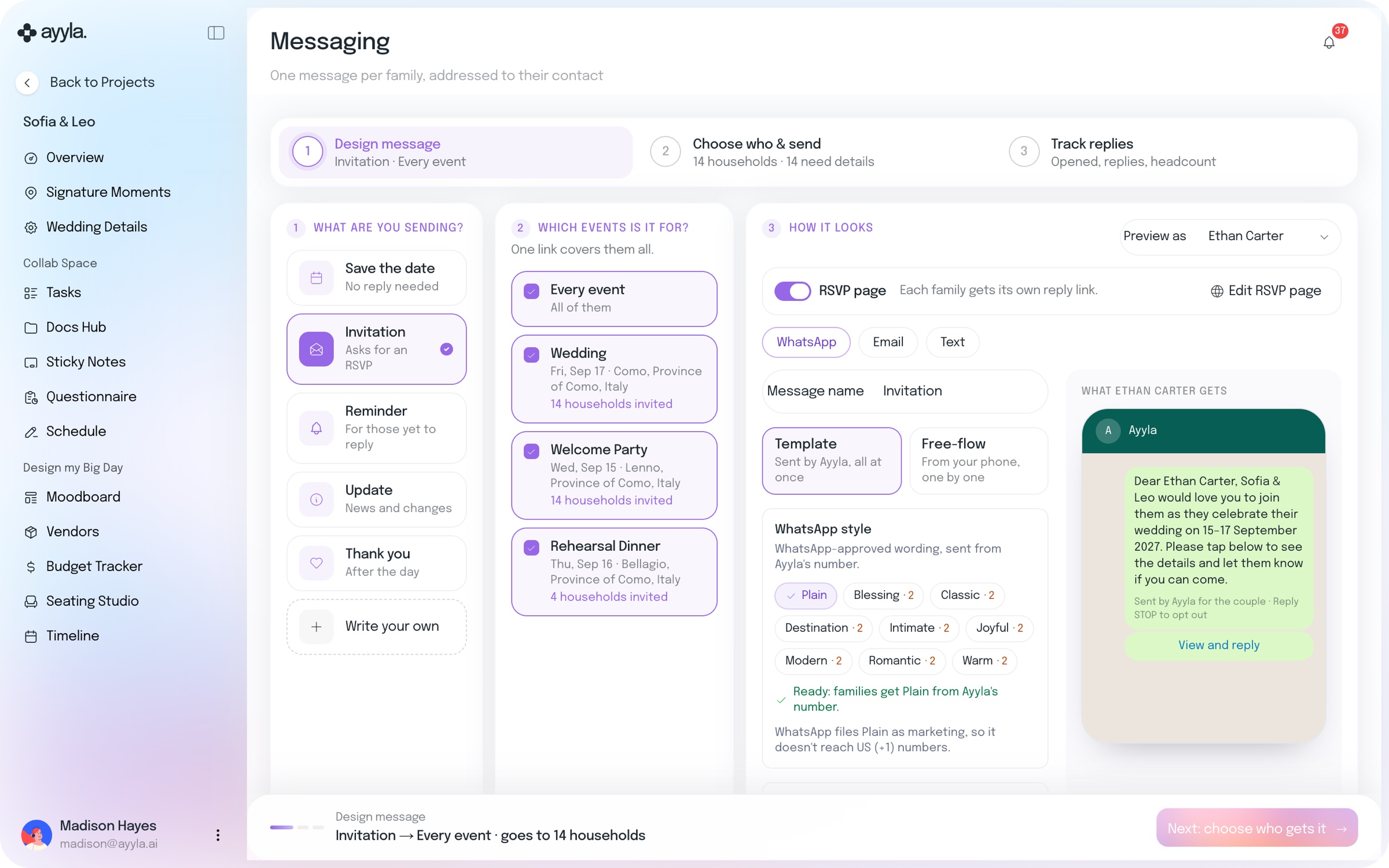
Messaging in Sofia and Leo’s wedding in Ayyla, step 1 of 3: Design message, then Choose who and send (14 households), then Track replies. An invitation for every event: the Wedding on Fri, Sep 17 in Como and the Welcome Party, 14 households invited each, and the Rehearsal Dinner in Bellagio, 4 households. The RSVP page is on, sent by WhatsApp as a template from Ayyla’s number, with a preview of what Ethan Carter gets: Dear Ethan Carter, Sofia & Leo would love you to join them as they celebrate their wedding on 15–17 September 2027, and a View and reply button.
  • From their phone
  • Both sides, one list
  • Households
  • Send to every family at once
  • WhatsApp, email, text
  • Replies and headcount

From contacts to seats

Add them, invite them, seat them.

  1. 1

    Your couple shares contacts from their phone, or sends a spreadsheet or a photo of a list.

  2. 2

    Organize both sides together: households, events and tags, many guests at once.

  3. 3

    Send it once to every family by WhatsApp, email or text, and track the replies.

Nobody retypes a name.

Straight from their phone, not from a spreadsheet.

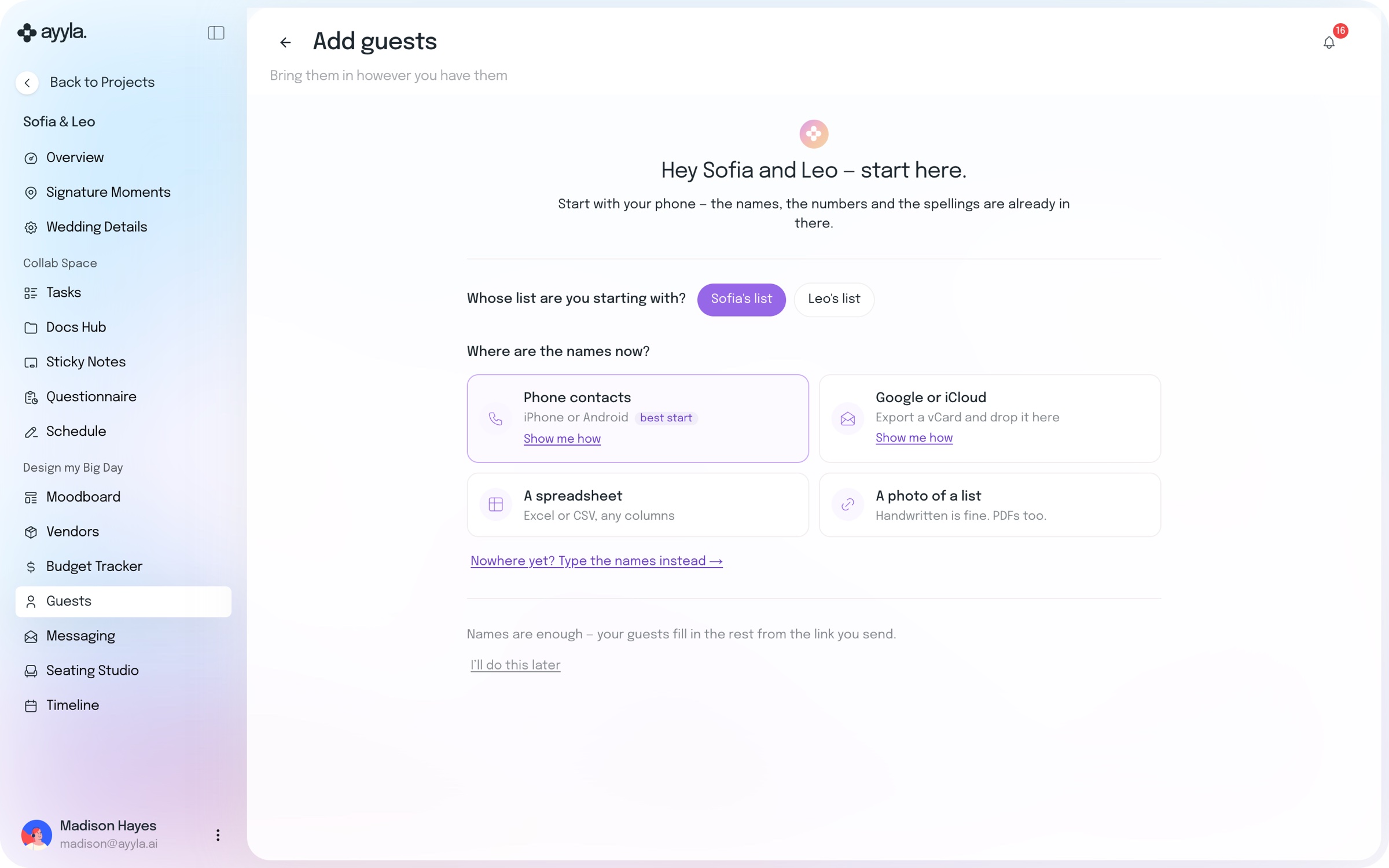
Choose whose list you’re starting with, then bring the names in from phone contacts on iPhone or Android, a vCard from Google or iCloud, any Excel or CSV file, or a photo of a list. Handwritten is fine, and PDFs too.

Add guests in Sofia and Leo’s wedding: Hey Sofia and Leo, start here. Start with your phone, the names, the numbers and the spellings are already in there. Whose list are you starting with: Sofia’s list or Leo’s list. Where are the names now: phone contacts (iPhone or Android, best start), Google or iCloud (export a vCard and drop it here), a spreadsheet (Excel or CSV, any columns) or a photo of a list (handwritten is fine, PDFs too).

Your list and theirs, organized together.

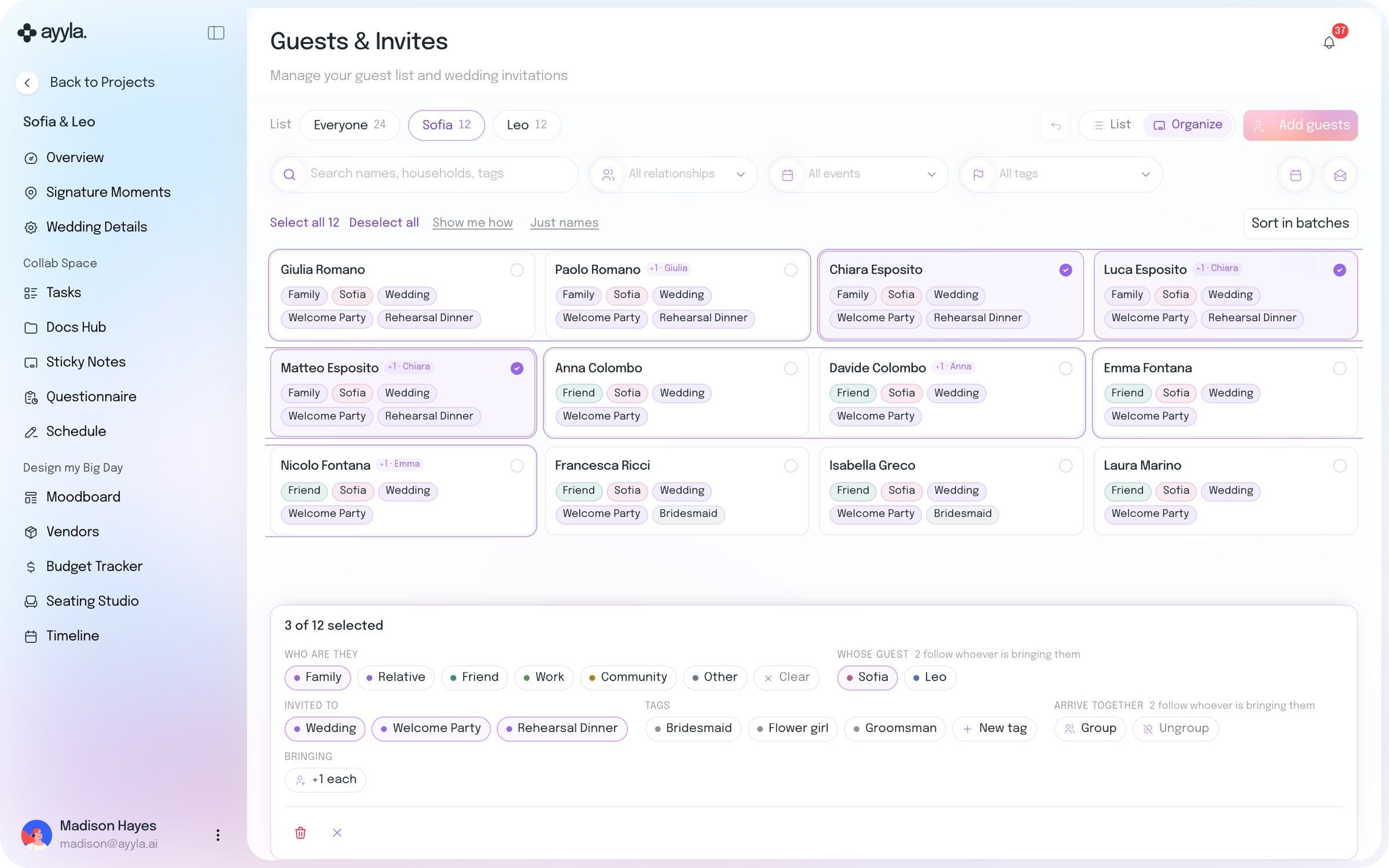
Both sides live in one list. Tick any number of guests and change them together: family or friends, whose side they’re on, which events they’re invited to, tags such as Bridesmaid, and who comes as a household.

Sofia’s side of the guest list in Organize view: 12 guests as cards, marked Family or Friend with the events they’re invited to and partners shown as a plus-one. Three Espositos are ticked, and the bar below changes them together: who they are, whose guest, the events they’re invited to, tags such as Bridesmaid, Flower girl and Groomsman, households and plus-ones.

Send it once. Every family gets it.

No more copying the same invitation into 150 chats, or chasing replies one by one. Choose a save the date, an invitation, a reminder for those yet to reply, an update or a thank you, pick the events it covers and send it to every family at once, on WhatsApp, by text or by email, wherever they actually read. Each family gets its own reply link, and you see who opened it, who replied and the headcount.

Designing an invitation in Ayyla Messaging for Sofia and Leo’s wedding: the message type, the three events it covers with the households invited to each, the RSVP page switch, WhatsApp, Email or Text, and a preview of the message one guest gets.

Guests belong to the wedding.

Send it once. Every family gets it.

Questions, answered.

Everything planners usually want to know before moving a guest list into Ayyla.

Does my couple still need a guest-list spreadsheet?

No. They can share contacts straight from their phone, send a vCard from Google or iCloud, or take a photo of a list they already have. If they do have a spreadsheet, any columns work.

Do I have to message each family one by one?

No. Write the message once and Ayyla sends it to every family you choose, at once, each with its own reply link. If you’d rather send a personal note from your own phone, you can do that too, one by one.

Which channels can I send from?

WhatsApp, email or text. A template message is sent by Ayyla to everyone at once; a free-flow message goes from your phone, one by one.

How do guests RSVP?

Each family gets its own reply link. Their RSVP page asks about each event they’re invited to, and you see who opened the message, who replied and the headcount.

Do I need everyone’s details first?

No. Names are enough to start. Guests fill in their own details from the link you send.

Does the guest list connect to seating?

Yes. Seating Studio counts who’s invited against the chairs in your floor plan, so you see how many seats are spare before you seat anyone.

You shouldn’t work for your software. It should work for you.

Your couple’s guest list and every invitation, sent at once.

14-day free trial · No credit card required

Social

Instagram

Facebook

LinkedIn

Youtube

Contact

Email

Whatsapp

Resources

Blog

Privacy Policy

Terms of Service

ayyla. ©2026. All rights reserved. 

Social

Instagram

Facebook

LinkedIn

Youtube

Contact

Email

Whatsapp

Resources

Blog

Privacy Policy

Terms of Service

ayyla. ©2026. All rights reserved. 

Create a free website with Framer, the website builder loved by startups, designers and agencies.